

The provided diagram visually outlines the API endpoints available in Nuitee Connect v3, categorized into four main sections: Hotel Data API, Search API, and Booking API, Loyalty API.
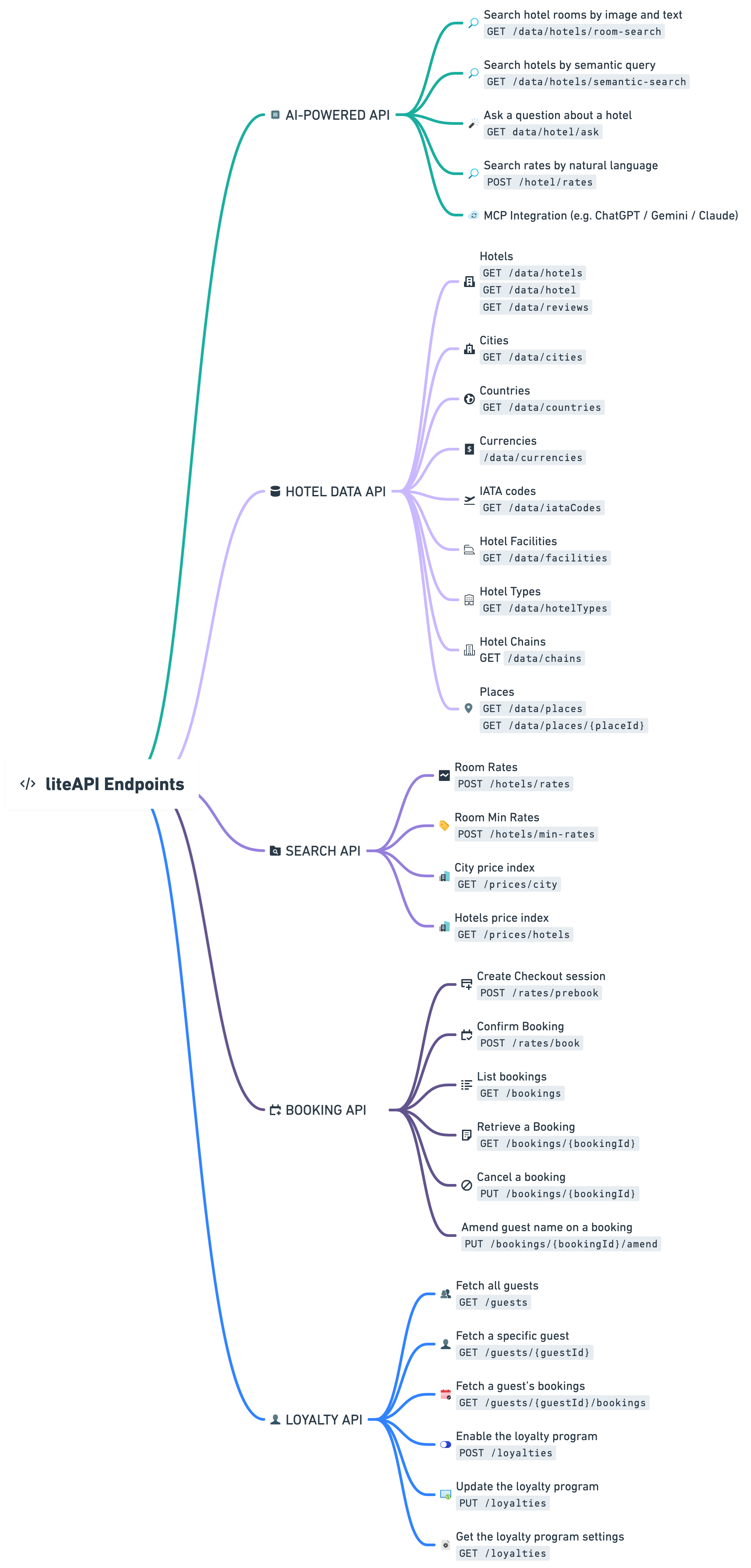
Endpoints breakdown for the main endpoints
Hotel Data API:
- Hotels:
GET /data/hotels: Retrieve a list of hotels.GET /data/hotel: Get detailed information about a specific hotel.GET /data/reviews: Access reviews for a specific hotel.
- Cities:
GET /data/cities: Fetch a list of cities within a specified country.
- Countries:
GET /data/countries: Obtain a list of all countries.
- Currencies:
GET /data/currencies: Retrieve a list of supported currencies.
- IATA codes:
GET /data/iataCodes: Get IATA codes for airports and cities.
- Hotel Facilities
GET /data/facilities: List the Hotel facilities
- Hotel Types
GET /data/hotelTypes: List of the Hotel types
- Hotel Chains
GET /data/chains: List of Hotel chains
Search API:
- Room Rates:
POST /hotels/rates: Request room rates for a list of hotel IDs.
Booking API:
- Create Checkout Session:
POST /rates/prebook: Initiate a prebooking session and obtain a transaction ID.
- Confirm Booking:
POST /rates/book: Confirm a booking with the transaction ID.
- List Bookings:
GET /bookings: Retrieve a list of all bookings.
- Retrieve a Booking:
GET /bookings/{bookingId}: Get details of a specific booking.
- Cancel a Booking:
PUT /bookings/{bookingId}: Cancel a specific booking.
Loyalty API:
- Fetch all guests
GET /guests: Fetches a list of all guests along with their loyalty program information, including accumulated points and booking history.
- Fetch a specific guest
GET /guests/{guestId}: Fetches detailed information about a guest, including personal data, loyalty points, and booking history.
- Fetch all guest's bookings
GET /guests/{guestId}/bookings: Retrieves a list of all bookings associated with a specific guest, including details about the points earned and cashback applied for each booking.
- Enable the loyalty program
POST /loyalties: Enables or disables the loyalty program with the specified cashback rate (e.g. use “0.03” for 3% cashback).
- Update the loyalty program
PUT /loyalties: Updates the loyalty program settings, including status and cashback rates.
- Get the loyalty program settings
GET /loyalties: Retrieves information about current loyalty program settings, including status and cashback rates.