

Nuitee Connect MCP for AI Agents lets AI clients call Nuitee Connect APIs — search, rates, book — plus documentation tools.
Connect MCP for AI Agents when an agent should call Nuitee Connect itself. To have the agent write the booking app, install Skills for coding agents.
Need documentation and product knowledge only? Use MCP for Developer Integrations at https://mcp.liteapi.travel/api/knowledge (no API key, no live booking tools).
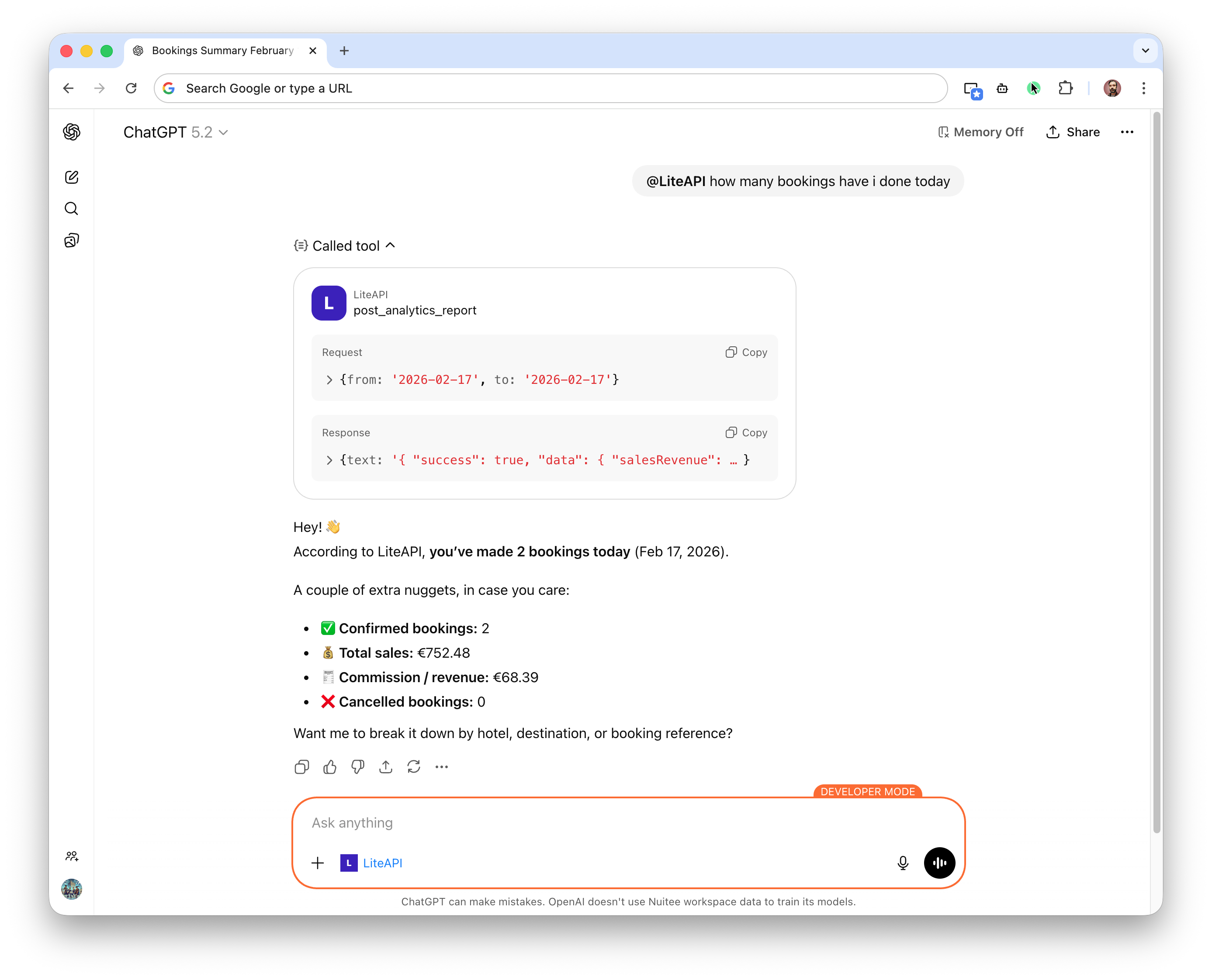
MCP for AI Agents enables AI assistants to run operations on your account by leveraging the API endpoints made available.
Endpoint
The Nuitee Connect MCP server is available at:
https://mcp.liteapi.travel/api/mcpSend your API key on the X-API-Key header. ?apiKey= on that URL also works. Prefer the header so the key is not stored in access logs.
For sample calls, send the shared sandbox key sand_ca230deb-5a6b-42e7-bb72-869facd8892b. A connection with no key can return 401 unauthorized on a tool call. Send your own key to use your account.
⚠️ Never expose production API keys in client-side applications.
What Is MCP?
MCP (Model Context Protocol) is a standardized way for AI models to:
- Discover available tools
- Call APIs in a structured format
- Receive machine-readable responses
- Perform multi-step workflows safely
The Nuitee Connect MCP server wraps Nuitee Connect functionality as structured tools that AI systems can call deterministically.
Tools preview
The server currently exposes 127 tools: the same 7 discovery tools as MCP for Developer Integrations, plus ~120 live API execute tools that call Nuitee Connect on your account. The catalog follows the OpenAPI surface and may grow.
Discovery tools
| Tool | What it does |
|---|---|
list_endpoints | Search the local OpenAPI catalog by name, path, summary, or tag. |
describe_endpoint | Return the HTTP contract for one endpoint. Does not call the API. |
search_docs | Search public pages on docs.liteapi.travel. |
fetch_docs_page | Read one docs page as plain text by URL. |
fetch_documentation | Load a curated OpenAPI/docs overview by key (searchApi, bookingApi, …). |
search_dashboard_kb | Search Nuitee Connect product guides (dashboard UI). |
fetch_dashboard_feature | Read one product guide by slug. |
Live API tools (by area)
| Area | Count | Example tools |
|---|---|---|
| Hotels & content | ~30 | post_hotels_rates, post_hotels_min_rates, get_data_hotels, get_data_places, get_data_hotel |
| Hotel booking | ~11 | post_rates_prebook, post_rates_book, get_bookings_bookingid, listBookings, put_bookings_bookingid |
| Flights | ~23 | post_flights_rates, post_flights_verify, post_flights_prebooks, post_flights_bookings, searchFlightsMatrix |
| Experiences | ~10 | searchExperienceTours, prebookExperienceTour, createExperienceBooking, getExperienceBooking |
| eSIM | ~12 | getESimplyDestinations, getESimplyPackagesByDestination, createESimplyCart, submitESimplyOrder |
| Guests & loyalty | ~7 | get_guests, get_loyalties, post_guests_guestid_loyalty_points_redeem |
| Vouchers | ~8 | post_vouchers, get_vouchers, get_vouchers_history |
| Analytics & reports | ~8 | post_analytics_report, post_analytics_weekly, post_commissions_report |
| Mapping / matching | ~11 | get_hotels-match-partners, post_hotels-match-async, post_rooms-match |
Call tools/list on https://mcp.liteapi.travel/api/mcp (with your key) for the full live list and input schemas.
Documentation-only agents should use MCP for Developer Integrations at https://mcp.liteapi.travel/api/knowledge (same seven discovery tools, no live API execute tools, no key).
To have a coding agent build the app in your repo, install the skill for coding agents. Keep the API key on your server. Use MCP for AI Agents when the agent should call the API itself.
OAuth
Clients that offer OAuth (Lovable, Claude, ChatGPT, Cursor) use the server URL alone:
https://mcp.liteapi.travel/api/mcpLeave client id and client secret empty. The client registers itself, then opens Nuitée Connect. Approval uses the dashboard session at https://connect.nuitee.com. Choose sandbox or production there. The access token is not your API key. The MCP server exchanges it for the key on that account.
X-API-Key still works for clients that only have a header.
Authentication
Pass your Nuitee Connect API key on the X-API-Key header. The header name is case-insensitive.
X-API-Key: YOUR_API_KEYThese also work:
- Query parameter:
?apiKey=YOUR_API_KEY Authorization: Bearer YOUR_API_KEY
If more than one is set, the header is the one that is used. Prefer the header. Query parameters end up in access logs.
- Sample calls use the shared sandbox key
sand_ca230deb-5a6b-42e7-bb72-869facd8892bonX-API-Key. A missing key can return401. Discovery and docs tools work with that sandbox key. - Sandbox and production keys must match their respective environments
- Rate limits apply as per your API plan
Example Configuration (AI Tooling)
{
  "mcpServers": {
    "liteapi": {
      "url": "https://mcp.liteapi.travel/api/mcp",
      "headers": {
        "X-API-Key": "sand_ca230deb-5a6b-42e7-bb72-869facd8892b"
      }
    }
  }
}
The value above is the shared sandbox key. Replace it with your Nuitee Connect key to use your account.
Rate Limits & Usage
The MCP server follows standard Nuitee Connect API policies:
- Default rate limit: 500 requests per second
- HTTP 429 returned when rate limited
- Usage billed according to endpoint pricing
- Monitoring available in the Nuitee Connect dashboard
Security Considerations
When integrating AI systems with Nuitee Connect MCP:
- Store API keys securely (e.g., environment variables or secret managers)
- Do not embed keys in client-side code
- Implement retry and backoff logic
- Monitor agent behavior to prevent excessive calls