

Using Nuitee Connect webhooks
Introduction
Nuitee Connect webhooks let your application react to hotel and flight booking activity as it happens — without polling, scheduled jobs, or manual reconciliation.
Instead of repeatedly querying the API to check whether something changed, you can subscribe to specific events (like a prebook, confirmed booking, cancellation, amendment, or flight booking state changes) and receive a real-time HTTP request whenever that event occurs.
This makes webhooks ideal for:
- Keeping your internal booking state in sync with Nuitee Connect (hotels and flights, where enabled)
- Triggering downstream workflows (emails, CRM updates, analytics, fulfillment)
- Monitoring booking and booking-management activity programmatically
How Nuitee Connect webhooks work (at a glance)
- You register an HTTPS endpoint in the Nuitee Connect dashboard
- You choose which events you want to receive
- When one of those events occurs, Nuitee Connect sends a POST request to your endpoint
- Your system processes the payload and responds with a 2xx status code
That’s it. There’s no special handshake, no long-lived connection, and no additional infrastructure required.
When should you use webhooks?
Use webhooks when you need to:
- React immediately to hotel or flight booking lifecycle changes
- Keep external systems in sync without polling
- Track booking amendments or cancellations reliably
- Validate that booking flows (like prebook → book) are working end-to-end
If you only need data on demand, direct API calls are usually enough.
If you need to respond to changes, webhooks are the right tool.
What this guide covers
This guide walks you through:
- Setting up your first webhook endpoint
- Subscribing to hotel and flight booking-related events
- Testing your setup in minutes using a public webhook receiver
- Understanding webhook payloads and common integration patterns
- Known limitations and current constraints to be aware of
You can jump straight to the quick start if you want to see your first event fire right away, or scroll down to the following sections for more details on the fields and process.
Quick Start: Receive Your First Event in 5 Minutes
This quick start walks you through receiving a real webhook event from Nuitee Connect using a public test endpoint. You don’t need to write any backend code to validate that your setup works.
By the end of this section, you’ll see a live webhook payload arrive in real time.
Step 1: Create a test webhook endpoint
For quick validation, we recommend using https://webhook.site/.
- Open https://webhook.site/ and leave it open in a tab
- Copy the unique webhook URL generated for you
(for example:https://webhook.site/xxxx-xxxx-xxxx)
This URL will display every request it receives, making it ideal for testing.
Step 2: Register the webhook in the Nuitee Connect dashboard
- Go to Developer tools → Webhooks in the Nuitee Connect dashboard
- Click Register Endpoint
- Fill in the following fields:
- Webhook URL: paste the webhook.site URL
- Description: e.g. Prebook test webhook
- Authentication Token: leave empty
- Retry settings: leave defaults for now
- Under Event Subscriptions, select:
booking.prebook - Click Register Webhook
Your endpoint is now active.
Step 3: Trigger a prebook event
To trigger a booking.prebook event:
- Open your Nuitee Connect whitelabel booking site
- Search for a hotel
- Select a room
Room selection automatically triggers a prebook request.
Step 4: Verify the webhook delivery
Go back to your webhook.site page.
You should see a new incoming request containing:
- An event_id
- An event_name set to
booking.prebook - A request and response payload
If you see the event arrive, your webhook is working correctly 🎉
If you don’t see anything
Quick things to check:
- The webhook endpoint is enabled
- booking.prebook is selected in event subscriptions
- The webhook URL is copied correctly (no trailing spaces)
- Your project/environment matches the whitelabel you’re testing
Once this works, you’re ready to move beyond testing and start handling webhooks in your own application.
Registering a Webhook Endpoint in the Dashboard
Once you’ve confirmed that webhooks work end-to-end, you’ll want to configure your endpoint properly for ongoing use. This section explains each option in the Nuitee Connect webhook configuration and when it matters.
You can access webhook settings from the Nuitee Connect dashboard at:
Developer tools → Webhooks
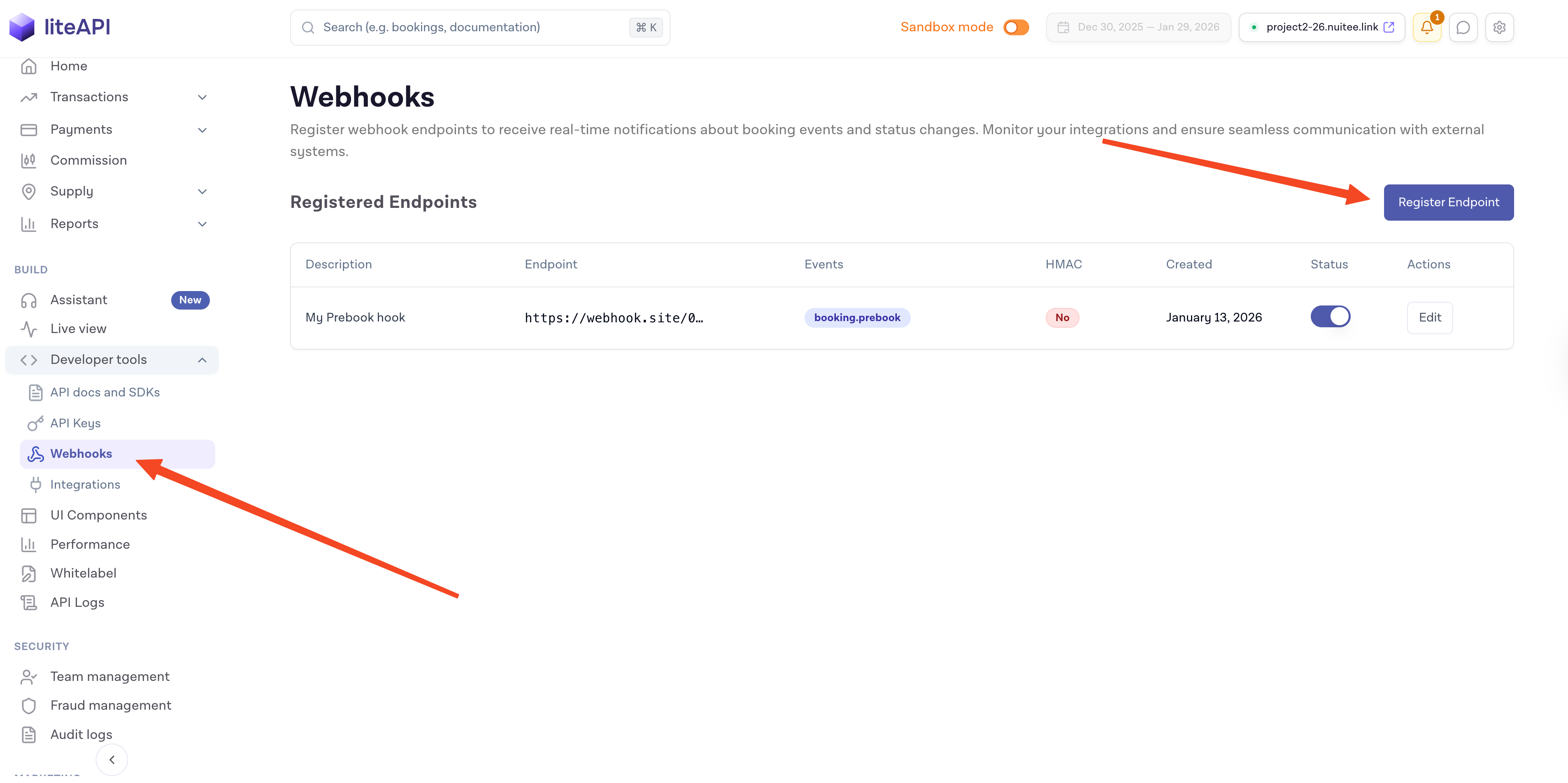
From here, you can register new endpoints, edit existing ones, enable or disable delivery, and adjust retry behavior.
Webhook configuration fields
When registering (or editing) a webhook endpoint, you’ll see the following fields.
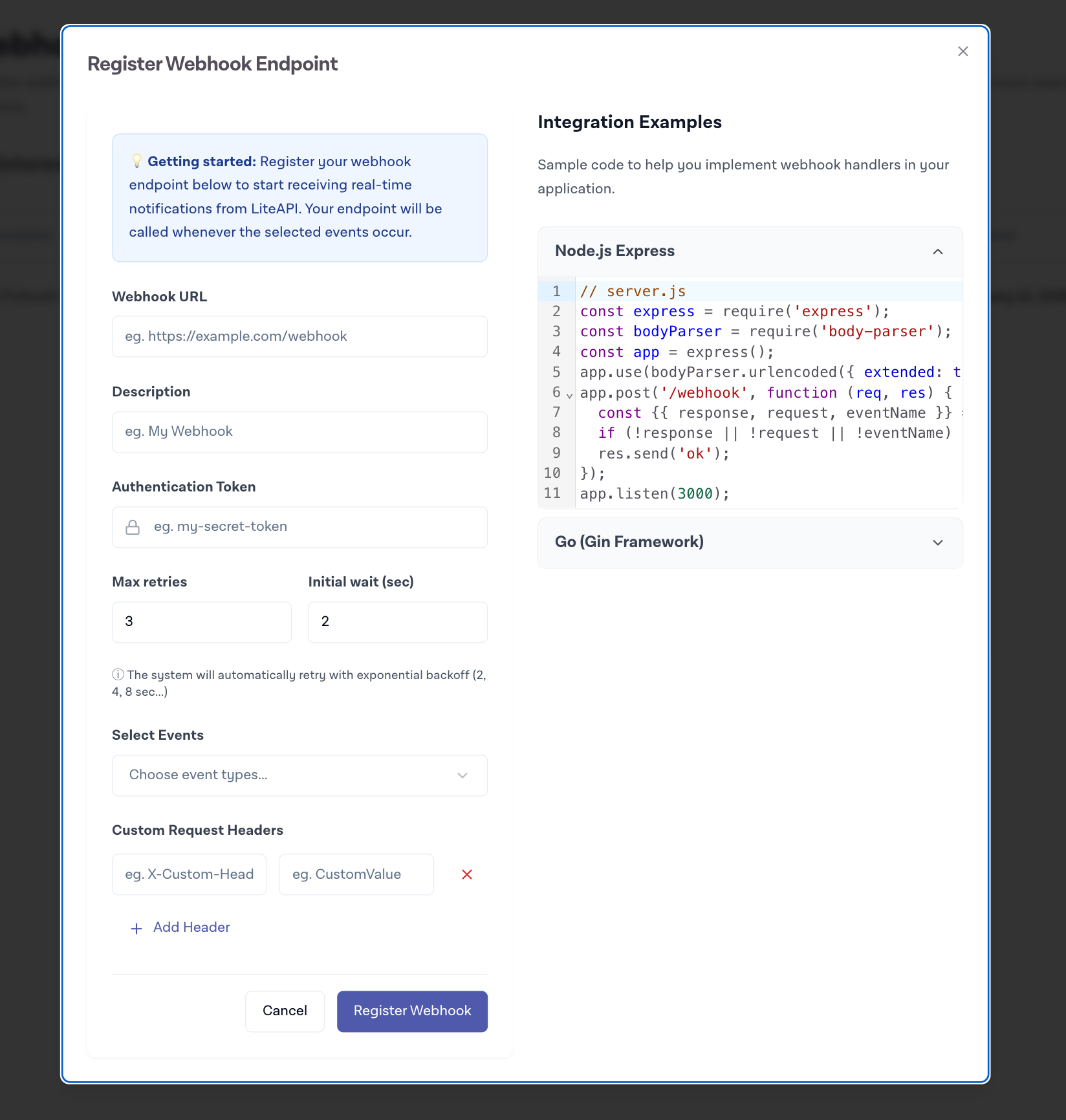
Webhook URL
The HTTPS endpoint Nuitee Connect will send events to.
- Must be publicly reachable
- Must respond with a 2xx status code to acknowledge receipt
⭐️ Note: The 2xx response is so the system knows not to keep retrying according to your retry settings.
Description
A free-text label to help you identify the webhook.
Authentication Token
An optional shared secret sent with each webhook request as the value for authorization in the header.
- Useful for validating that requests originate from Nuitee Connect
- Typically checked via a request header in your handler
- Strongly recommended for production environments
Retry configuration
Nuitee Connect retries webhook delivery automatically when your endpoint does not return a successful response.
Max retries
The maximum number of retry attempts before the event is dropped.
Initial wait (seconds)
The delay before the first retry attempt.
Retries use exponential backoff, meaning subsequent retries wait longer between attempts.
For most use cases, the default values are sufficient.
Event subscriptions
This determines which events will be sent to your endpoint.
You can subscribe to multiple events per webhook, but routing logic will be needed as different events — especially hotel versus flight — can use different payload shapes inside request and response.
Custom request headers
You can attach additional HTTP headers to every webhook request.
Typical uses include:
- Passing environment identifiers
- Adding correlation IDs
- Supporting internal routing or logging
These headers are static and sent with every event.
Managing existing endpoints
From the Webhooks list view, you can:
- Enable or disable an endpoint without deleting it
- Edit configuration details
- Update subscribed events
Events You Can Subscribe To
Nuitee Connect webhooks are organized around hotel booking lifecycle and booking-management workflows, and flight booking lifecycle events where flight booking is enabled on your account. Each event represents a meaningful state change that your application may want to react to.
You can subscribe to multiple events on a single webhook endpoint, but we recommend starting with the minimum set needed for your use case and expanding as needed.
Hotel booking lifecycle events
booking.prebook
Triggered when a user selects a room, and Nuitee Connect performs a prebook request.
Typical uses:
- Useful for testing, but generally far too noisy to be useful for production.
booking.book
Triggered when a booking is successfully confirmed.
Typical uses:
- Create or update an internal booking record
- Send confirmation emails or messages
- Trigger downstream fulfillment workflows
booking.cancel
Triggered when a user cancels their booking.
Typical uses:
- Update internal booking records
booking.book.hotelConfirmationNumber
Triggered when the hotel confirmation number is added or updated.
Typical uses:
- Syncing confirmation numbers to customer-facing systems
- Updating itineraries or vouchers
booking.checkinInstruction
Triggered when check-in instructions for the guest become available or are updated (for example hotel-supplied arrival details, access codes, or front-desk notes).
Typical uses:
- Sending pre-arrival communications to guests
- Surfacing check-in details in your app or itinerary views
⭐️Important
While Prebook and Book work, be aware that some webhooks, like the cancel webhook, only work in production. Since sandbox bookings never trigger some of the necessary steps later downstream, such as refund processing when canceling.
Booking API errors
For failures during core hotel booking API steps, Nuitee Connect exposes three webhook events (there are no separate _error events for amendments, rebooks, refunds, compensation, or hotel confirmation number updates in the event catalog today):
booking.prebook_error
Triggered when the prebook step fails (for example availability, validation, or supplier error).
Typical uses:
- Monitoring and alerting on funnel breakage before payment
- Customer support workflows when checkout fails
booking.book_error
Triggered when the confirm/book step fails (for example payment, validation, or supplier rejection).
Typical uses:
- Recovering abandoned carts or retry flows where appropriate
- Alerting when confirmations drop unexpectedly
booking.cancel_error
Triggered when a cancellation request fails or is rejected.
Typical uses:
- Ops alerting when a cancel cannot be completed
- Syncing internal state when cancel flows fail
Amendment and booking-management events
If you have agents on your account who handle support, these webhooks allow you to track amendments and related actions on existing bookings.
booking.rebook.rfn — A refundable room is rebooked
booking.rebook.nrfn — A non-refundable room is rebooked
booking.amendment — Changes to the booking information, like guest name or special requests
booking.amendment.relocation — Due to unforeseen circumstances, the guest is relocated
booking.refund — A refund is issued for the booking
booking.compensation — Compensation is given to the client (usually related to relocation or an issue with the room)
Flight booking events
Where flight booking is enabled, you can subscribe to flight lifecycle events. Payload shapes differ from hotel webhooks; branch on event_name and parse stringified request / response per event.
Prebook events
flight.prebook — A flight prebook was created (availability and pricing locked before payment).
request: the prebook request you sentresponse: the prebook (same shape as the prebook API response, includingprebookId)
flight.attachServices — Ancillary services (for example seats or baggage) were attached to a prebook.
request: the attach-services request you sentresponse: the updated prebook
Booking lifecycle events
A flight booking is confirmed asynchronously: the book call returns first, and ticketing by the airline happens later.
flight.book.created — The book call succeeded and the booking was created, but it has not been sent for confirmation yet.
flight.book.pending.confirmation — The book call succeeded and the booking is waiting for the airline to issue the ticket.
- For both events,
requestis the book request you sent andresponseis the booking (same shape asGET /flights/bookings/{bookingId}). - Only one of the two fires per book call, depending on the status the booking has when the call returns.
flight.book.confirmed — The airline issued the ticket and the booking is confirmed.
response: the full booking (same shape asGET /flights/bookings/{bookingId})
flight.book.cancelled — The cancellation is final. Fired for both CANCELLED and CANCELLED_WITH_CHARGES.
request:bookingIdandclientReference(when set)response: the cancellation result (same shape as thedataofPOST /flights/bookings/{bookingId}/cancellations):
| Field | Meaning |
|---|---|
status | CANCELLED or CANCELLED_WITH_CHARGES |
cancellation_fee | Penalty kept |
refund_amount | Amount refunded |
refund_type | full, partial, or none |
currency | Currency of the amounts |
When the cancel request returns 202 (the airline is still processing it), this event fires later, once the cancellation is final. If the final refund figures arrive after that (for example after a manual review), the event is sent again with the corrected amounts.
Post-booking change events
These events do not change the booking status. Treat them as signals to refresh your copy of the booking.
flight.book.schedule_changed — The airline changed the itinerary (for example a flight substitution or new times) and the booking has already been updated.
response: the full booking with the updated segments, plus ascheduleChangeblock (detectedAt,changeCount,source, andsegments[]with the previous and new carrier, flight number, and times)
flight.book.provider_notification — The airline or GDS sent a notification about the booking. It tells you what kind of change happened, not the new values; call GET /flights/bookings/{bookingId} to read the current state.
response:bookingId,bookingRef,status,clientReference, and aproviderNotificationobject:
{
  "notificationId": "019473a2-b1c3-7def-8abc-1234567890ab",
  "notificationType": "schedule_change",
  "severity": "warning",
  "summary": "PNR change notification for ABC123",
  "matchedReference": { "type": "pnr", "value": "ABC123" },
  "occurredAt": "2026-09-03T10:00:00.000Z",
  "receivedAt": "2026-09-03T10:00:02Z"
}
notificationType is an open set; handle the values you need and fall back to a default for the rest:
notificationType | Default severity | Meaning |
|---|---|---|
schedule_change | warning | Itinerary or segment times changed |
flight_cancellation | critical | A segment was cancelled, or the booking lost all its flights |
price_change | warning | The fare or taxes were repriced |
ticket_time_limit | warning | The airline set a ticketing deadline |
void | warning | A ticket or EMD was voided or refunded |
name_change | warning | A passenger name was corrected or changed |
booking_modified | info | Any other change to the booking |
unknown | info | Received but not classified |
Deprecated events
flight.book.failed and flight.book.expired are still listed in the dashboard but are not currently emitted. A booking the airline does not ticket stays in PENDING_CONFIRMATION, and a book call that fails returns an error instead of firing an event.
⭐️Important
Flight events can arrive out of order (for example, flight.book.pending.confirmation after flight.book.confirmed). Don't let an older status overwrite a newer one; when in doubt, use GET /flights/bookings/{bookingId} as the source of truth.
Payload Schema and Structure
Every Nuitee Connect webhook request delivers an event envelope with a consistent top-level shape. Inside that envelope, the request and response fields contain the event-specific data.
Event envelope (top-level fields)
Each webhook payload includes:
event_id
A unique identifier for the webhook event delivery. Use this for deduplication and idempotency.
event_name
The event type (for example: booking.prebook, booking.book, booking.amendment, or flight.book.confirmed).
request
A JSON string containing the request data associated with the event.
response
A JSON string containing the response data associated with the event.
sandbox
Set to true or false. Use this to determine which environment triggered the webhook. (true = sandbox, false = production)
⭐️Important
request and response are stringified JSON, not JSON objects.
Your webhook handler must parse them before accessing fields.
Example structure (simplified)
{
  "event_id": "…",
  "event_name": "booking.prebook",
  "request": "{ \"offerId\": \"…\", \"clientReference\": \"…\" }",
  "response": "{ \"prebookId\": \"…\", \"hotelId\": \"…\", \"roomTypes\": [ … ] }",
  "sandbox": false
}
In most languages, you’ll do this in two steps:
- Parse the webhook body into an object
- Parse request and response again (because they are strings)
Idempotency and duplicates
Webhook delivery should be treated as at-least-once:
- If Nuitee Connect does not receive a 2xx response, it may retry
- Retries can result in the same event being delivered more than once
To safely handle this, your system should:
- Store
event_idafter successful processing - Ignore or short-circuit if the same
event_idis received again
A simple mental model:
event_id= delivery identity- Deduplicate by
event_id - Ensure your processing is safe to run more than once
Updated about 9 hours ago